Authentication
Authentication is how your application knows which user is making a request; authorization is how it decides whether that user has permission to make it. Both are covered in this guide:
- How to install the auth addon and what it adds to your application.
- How users are stored and how to create them.
- How to skip authentication for public pages.
- How sign-in and sign-out work end to end.
- How to customize the bundled sign-up and password-reset flows.
- How to extend these features.
1. Setup
The auth addon is installed on demand. It ships a username/password based implementation that's good enough for most applications, and easy to extend when it isn't.
From the project root:
$ proper install auth
This writes a fair amount into your application; the main pieces are:
- A
Usermodel and aSessionmodel, plus anAuthenticablemodel concern. - An
Authenticationcontroller concern - provided by the framework asproper.concerns.Authenticationand wired into yourAppControllerautomatically viaAuthentication.for_session(Session). - Three resource controllers -
SignUp,Session,PasswordReset- with their templates, forms, and routes already wired together. You typically edit those, not write them.
Don't forget to run the migration (named users) that adds the user and session tables:
$ proper db migrate
What is not included
- OAuth / single sign-on.
- Multi-factor authentication.
- Email confirmation. New users are signed in immediately on sign-up.
- Roles, groups, permissions. Covered as a pattern in Adding Groups and Permissions; not shipped as a feature.
2. The User Model
The generated models/user.py is intentionally small:
# myapp/models/user.py
import peewee as pw

from .base import BaseModel
from .concerns.authenticable import Authenticable


class User(Authenticable, BaseModel):
    created_at = pw.DateTimeField(default=pw.utcnow)
The heavy lifting lives in Authenticable, a model concern in myapp/models/concerns/authenticable.py. You own that file too, but you'll change it less often. It adds the two columns auth needs and the methods that operate on them:
class Authenticable(BaseModel):
    login = pw.CharField(255, null=False, unique=True, index=True)
    password = pw.CharField(255)
    # ...
login is the unique handle a user authenticates with - it can be a username or an email depending on what your app needs.
For security, login values are automatically normalized before lookup and before save: stripped of surrounding whitespace, with confusable Unicode characters folded together, lowercased, and stripped of internal spaces. That means "Jane Doe", "jane doe", and "JANE DOE " all resolve to the same "janedoe" row.
password stores the hash of the real password, not the plaintext. The Authenticable.create classmethod hashes incoming passwords before insert, and set_password does the same on existing rows. When a user signs in, User.authenticate(login, password) looks up the row by login and verifies the password against the stored hash.
2.1 Login as Email
By default, Authenticable exposes email as a property that returns login:
@property
def email(self):
    return self.login
In other words: the bundled assumption is that login is the email address. The sign-up form labels the field "Email", the sign-up template's input has type="email", and the password-reset mailer sends to user.email (which resolves to user.login). If you're happy treating the email as the username, you don't change anything.
This is the simplest path and the one most apps stick with. The "you" of your app picks an email at sign-up; if they change it, that is changing the login.
2.2 Or: a Separate Email Column
If you want login to be a username and email to be a separate thing the user can change without losing their account, override the property with a real column:
class User(Authenticable, BaseModel):
    email = pw.CharField(255, null=False, unique=True, index=True)
    created_at = pw.DateTimeField(default=pw.utcnow)
A column with the same name as the property replaces the property in peewee's model machinery. From that point on, user.email reads the new column, and user.login is the username.
One follow-up goes with this choice: add email = f.EmailField() to SignUpForm and an <input> for it in the sign-up template, then pass email=... to User.create(...) in SignUpController.create.
2.3 Extending the Model
Anything else you want on a user - display name, avatar, locale, timezone, accepted-terms-at - is a regular peewee field on User:
class User(Authenticable, BaseModel):
    name = pw.CharField(255, null=True)
    locale = pw.CharField(8, default="en_us")
    timezone = pw.CharField(64, default="utc")
    avatar = pw.ForeignKeyField(Attachment, null=True)
    created_at = pw.DateTimeField(default=pw.utcnow)
The locale and timezone columns are picked up automatically by the i18n addon's CurrentLocale and CurrentTimezone concerns if you have it installed - signed-in users get their preferences applied to every request without any extra wiring. avatar is a ForeignKeyField(Attachment) on the model, paired with AttachmentField - the matching form field from the storage addon - to handle uploads.
3. Creating Users
The auth addon ships an auth CLI namespace with two commands. Use them to create (or update) a development account, to recover an admin's access in an emergency, or to seed a test fixture that needs a real user to sign in as:
$ proper auth user alice@example.com hunter2
User added

$ proper auth password alice@example.com newhunter2
Password updated
Programmatically, the same shape works:
# Creates a new user, this also hashes the password and normalizes the login
user = User.create(login="alice@example.com", password="hunter2")

# Update the password
user.set_password("newhunter2")
user.save()
4. The Auth Session
When a user signs in, Proper creates a row in the session table and stores a random token that points to it in an _auth cookie; every request uses that value to look the row up and fill current.user (backed by the matching current.auth_session).
class Session(BaseModel):
    token = pw.CharField(...)            # opaque, indexed
    created_at = pw.DateTimeField(...)
    expires_at = pw.DateTimeField(...)   # absolute expiry
    last_seen_at = pw.DateTimeField(...) # rolling, updated on each request
    ip_address = pw.IPField(null=True)
    user_agent_hash = pw.CharField(...)  # SHA-256, never the raw UA
    user = pw.ForeignKeyField(User, ...)
    revoked = pw.BooleanField(...)
Note that there's both an absolute expires_at and a rolling last_seen_at.
The first is the hard ceiling (24 hours for a one-shot sign-in, 60 days when "remember me" is on - see "Adding a 'remember me' check"). The second is bumped on every request (via session.touch()).
A few methods you'd reach for:
session.revoke()           # flip revoked = True; immediate sign-out for that one session
session.is_valid()         # False once revoked or past expires_at
Session.find_by_token(t)   # returns the active session for a token, or None
Revoking is immediate because the lookup also checks revoked == False and expires_at > now(). There's no cookie-cached state to wait out.
Listing a user's active sessions
user.sessions (via the backref on the FK) gives you everything. Filter by revoked == False and expires_at > pw.utcnow() and you have the "manage active sessions" list. Building a small page that calls session.revoke() on a button click is straightforward; the model is already there.
4.1 current.user
current is a request-scoped container exposed by proper.current. Inside a controller, a view, an email template, or any code that runs during the request, current.user is the signed-in User or None:
from proper import current

if current.user:
    self.cards = Card.select().where(Card.user == current.user)
else:
    self.cards = []
In a template:
{% if current.user %}
  <p>Hi, {{ current.user.email }}.</p>
{% else %}
  <p><a href={{ url_for('Session.new') }}>Sign in</a></p>
{% endif %}
5. Skipping Authentication
The default of "every action requires sign-in" is the right default for most controllers, but not all. Three knobs let you opt out.
5.1 Whole-Controller Opt-Out
Set skip_authentication = True on the controller class:
@router.resource("about", pk=None)
class AboutController(AppController):
    skip_authentication = True

    def show(self):
        pass
Every action on this controller is reachable without signing in. current.user is still populated when a signed-in visitor lands on the page (the resume-session step runs first); it's just None for anonymous visitors.
5.2 Per-Action Opt-Out
Set skip_authentication to a list of action names instead:
@router.resource("books")
class BookController(AppController):
    skip_authentication = ["show", "index"]

    def index(self): ...
    def show(self): ...
    def new(self): ...     # still requires sign-in
    def create(self): ...  # still requires sign-in
    # ...
Listing and showing a book are public; everything else requires sign-in. The list is matched against self.request.matched_action, so the names you put here are the action names, not URL paths.
5.3 Redirect-Away-From-Public Pages
The reverse case - "the visitor is signed in, send them away from the sign-in page" - is what redirect_if_authenticated is for. The sign-in and sign-up controllers use it:
@router.resource("sign-up", pk=None)
class SignUpController(AppController):
    skip_authentication = True
    before = {"do": "redirect_if_authenticated"}
    # ...
The default redirect is /; pass default=... or use the saved _redirect value (the helper consults it) to send the visitor somewhere more useful.
6. Signing In and Out
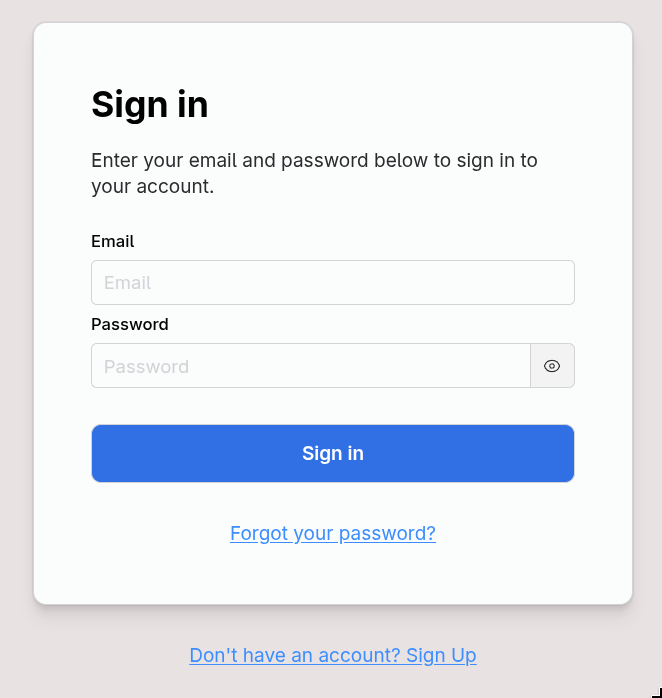
Sign-in is a generated resource controller at controllers/session_controller.py. The route is /sign-in, and the actions are new (the form), create (submit), and delete (sign out):
6.1 The Sign-In Form
The form as generated tells the user if the login doesn't exist or the password is wrong.
class SignInForm(f.Form):
    class Meta:
        messages = v.MESSAGES

    login = f.TextField(...)
    password = f.TextField(...)

    def validate_login(self, value):
        v.login_exists(value)  # (A)
        return value

    def after_validate(self) -> bool:
        login = self.login.value
        password = self.password.value
        user = User.authenticate(login=login, password=password)
        if not user:
            self.password.error = v.ERROR_PASSWORD  # (A)
            # self.login.error = v.ERROR_AUTH  # (B)
            return False
        return True
You can easily go back to a generic "Invalid username and/or password" message, by commenting the (A) lines and un-commenting the (B) lines. See Revealing vs Hiding Account Existence for the tradeoff.
6.2 Signing a User In Programmatically
For any flow that creates a session - a magic-link callback, an OAuth integration, etc. - call new_session_for(user):
self.new_session_for(user)
self.redirect_after_authentication(flash="Welcome!")
That creates the Session row, sets the _auth cookie, and assigns current.user. After it returns, the request is "signed in" from Proper's perspective.
redirect_after_authentication pops the _redirect value the require_authentication callback stashed in the session (the page the user originally asked for) and redirects there. Pass default="/somewhere" to control where the redirect goes when there's no saved URL.
6.3 Signing a User Out Programmatically
terminate_session is the corresponding teardown:
self.terminate_session()
self.response.redirect_to("/")
It deletes the row (so the token can't be reused), clears the _auth cookie, drops current.user, and clears the rest of the session bag too so no per-user data leaks across visitors.
7. Signing Up
The auth addon includes a page for users to register at /sign-up.
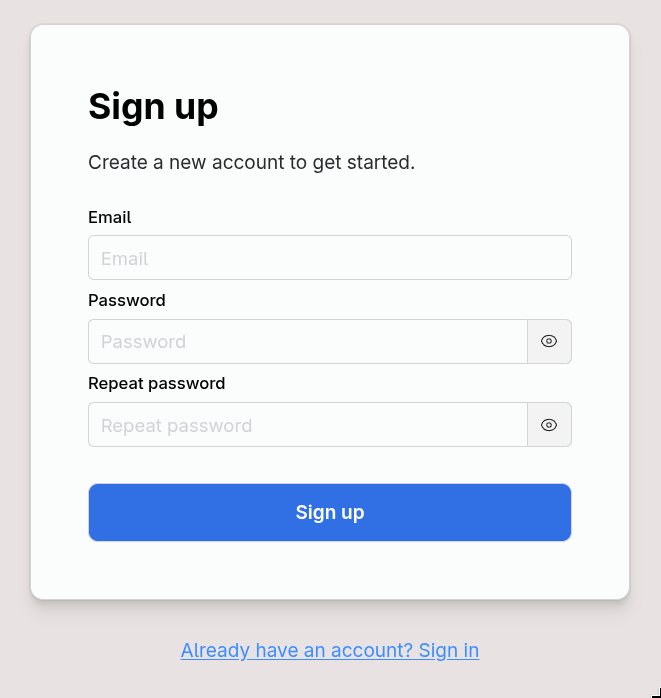
On success: create the user, start a session, redirect with a flash. It doesn't include email confirmation or a "verify your account" step.
7.1 The Sign-Up Form
The generated SignUpController is small. The interesting code is in the SignUpForm, where the validation rules live. Three checks ship by default:
login_is_available
Rejects the submission if the login already exists. Side-effect: the response confirms whether or not an account exists for that email, which a malicious visitor can use to enumerate users.
password_is_long_enough
Checks against AUTH_PASSWORD_MINLEN (default 9, see the Configuration section).
password_hasnt_been_pwned
Uses the Have I Been Pwned API to reject commonly used passwords (uses the first 5 characters of the password's SHA-1 to check).
If the API is unreachable, it falls back to a tiny built-in list of common passwords (password123, qwerty1234, etc.) - good enough to catch the laziest choices.
For a high-traffic app, you might want to swap this for a check against a locally hosted copy of the password list.
7.2 Customizing the Sign-Up Flow
The generated form is a starting point, not a contract. Three knobs come up often:
- Drop the pwned check: The API call adds a small latency and an external dependency; if you don't want either, skip it.
- Add an email confirmation step by not calling
new_session_for(user)increate. Instead, generate a token (user.generate_token_for("confirm_email")), email it, add a confirmation controller that resolves the token and flips aconfirmed_atfield, and only allow sign-in for confirmed users (overrideUser.authenticateto check the flag). - Collect extra fields at sign-up (display name, accepted-terms-at) by adding fields to
SignUpForm, inputs to the sign-up template, and passing the values toUser.create(...).
8. Password Reset
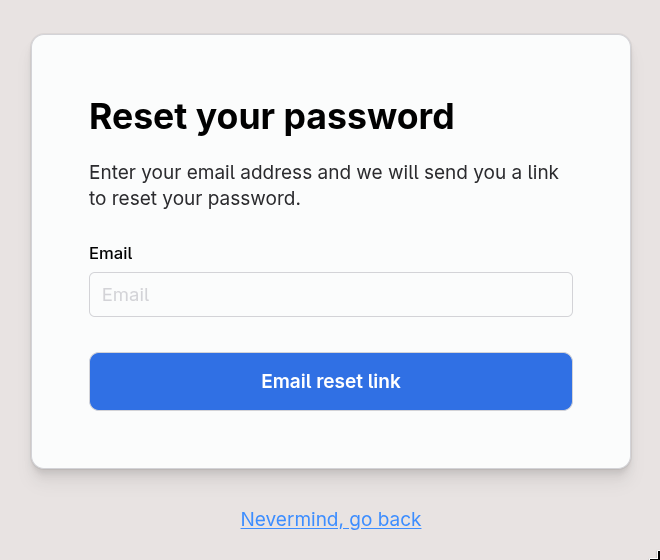
The generated PasswordResetController is the most interesting of the three, because it juggles a token through email and back. The route is password-reset, and the actions form a small flow:
| Step | Route | Purpose |
|---|---|---|
| 1. | GET /password-reset/new |
what's your email? |
| 2. | POST /password-reset |
send the email, save email to session |
| 3. | GET /password-reset/sent |
"check your email" confirmation page |
| 4. | GET /password-reset/:token/edit |
set a new password |
| 5. | PATCH /password-reset/:token |
update password, sign in, redirect |
Step 3 uses the show action with the literal string "sent" as the :token URL segment - a way to render a confirmation page through the same resource without a separate route.
8.1 The Token
The link in the email looks like /password-reset/<long-signed-token>/edit. The token is signed (so it can't be forged) but not encrypted (so don't put anything sensitive in it). It embeds the user's primary key and a fingerprint: a deterministic value the model produces that changes when the token should become invalid.
Look at Authenticable.generate_token_for_password_reset:
def generate_token_for_password_reset(self):
    # Invalidate when password hash changes
    return (self.password or "")[-20::2]
The fingerprint is a slice of the password hash. When the user actually completes the reset, their password hash changes, the fingerprint changes, and any old reset link they had stops working. A leaked link from yesterday can't be used after today's reset.
On the way back in, User.resolve_token_for("password_reset", token, max_age=...) verifies the signature, looks the user up by id, calls generate_token_for_password_reset again, and compares it to the fingerprint baked into the token. If they don't match, the token is treated as revoked.
max_age is enforced too, via config.AUTH_TOKEN_LIFE (default: 3 hours; see the Configuration section). Past that, the signature check fails and resolve_token_for returns None.
8.2 The Password-Reset Form
class PasswordResetForm(f.Form):
    class Meta:
        messages = v.MESSAGES

    login = f.TextField(messages={"required": "Please write your email"})

    def validate_login(self, value):
        v.login_exists(value)  # (A)
        return value
The form as generated tells the user whether or not an account exists for that email. That's the (A) line. If you'd rather not leak account existence, comment that line out and edit views/password_reset/show.jx to always say "if your account exists, we sent you an email." See Revealing vs Hiding Account Existence for the tradeoff.
PasswordChangeForm is the form that submits the new password. Same password_is_long_enough and password_hasnt_been_pwned checks as SignUpForm, same password1 == password2 confirmation in after_validate.
9. Revealing vs Hiding Account Existence
The (A)/(B) toggle in the forms is a real product decision, not a bug.
Revealing (the default): "We don't recognize that username. Want to try another?" Friendlier when most reset attempts are by legitimate but forgetful users. Lets an attacker enumerate emails - "is this account a customer?" - one request at a time, subject to the rate limit (10 per 15 minutes by default). Leaving it as-is can prevent many support tickets.
Hiding (the alternative): "If an account exists with that email, we've sent a reset link." Less friendly (a typo'd email doesn't get a "no such user" hint), but doesn't expose account existence. The rate limit still applies.
Revealing is what a lot of major apps do deliberately. GitHub, Slack, and most B2B SaaS tools use "no account found with that email" on login because the UX win is real.
However, you should absolutely switch to "hiding" for:
- Apps where the account existence is itself sensitive: dating, mental health, addiction support, adult content, whistleblower tools, etc. Here the privacy harm is the threat, and you should be consistent across signup, login, and reset.
- Apps under compliance regimes that explicitly require it; e.g.: some financial/healthcare contexts, certain government tenders, etc.
9.1 How to switch to "hiding"
For the sign-in page:
Comment out the login_exists(value) call and replace self.password.error = v.ERROR_PASSWORD with the generic self.login.error = v.ERROR_AUTH.
For the password reset page:
Comment out the login_exists(value) call in PasswordResetForm, and edit views/password_reset/show.jx to always show the generic message regardless of whether the email matched. The controller code doesn't need to change - it already routes to the same page in both cases.
For the sign-up page:
This is not so easy. You could split the sign-up in two: first the user enters their email address, then you send them an email with a link to continue their registration by setting a password.
10. Configuration
The auth-related settings live in config/auth.py and load into app.config. The defaults from the source:
| Key | Default | What it controls |
|---|---|---|
AUTH_HASH_NAME |
"argon2" |
Password hashing algorithm. See below for the allowed values. |
AUTH_ROUNDS |
None |
Cost factor for the hasher; None uses the algorithm's default. |
AUTH_PASSWORD_MINLEN |
9 |
Minimum password length, in characters. |
AUTH_PASSWORD_MAXLEN |
1024 |
Maximum password length, in characters. Caps DoS via large passwords. |
AUTH_TOKEN_LIFE |
3 * HOURS |
Max age of a password-reset token before resolve_token_for rejects it. |
Every key is written into the generated config/auth.py.
AUTH_HASH_NAME is one of argon2, bcrypt, bcrypt_sha256, pbkdf2_sha512, pbkdf2_sha256, sha512_crypt, sha256_crypt. Pass anything else and Proper raises WrongHashAlgorithm at startup. The default of argon2 is the right answer for new applications; the alternatives exist so you can match a hash format you inherited from another system.
Changing AUTH_HASH_NAME after you have users in the database isn't disruptive: each user's stored hash records which algorithm was used. The next time they sign in, User.authenticate verifies the password against the old hash, then re-hashes with the new algorithm and writes the result back. Old hashes phase out as users sign in.
AUTH_PASSWORD_MAXLEN is a denial-of-service cap, not a UX limit. Hashing a 10MB "password" with argon2 is slow on purpose, which means accepting unbounded password length opens you to slow-attack patterns. The default 1024 is generous.
Two more knobs live elsewhere:
- Session lifetime is controlled by
Session.create_for_user(remember=True|False)(60 days or 24 hours), not by a config key. See "Adding a 'remember me' check". - Sign-in and sign-up rate limits live on the generated controllers themselves (
rate_limit = [...]), so you tune them per controller without touching config.
11. Adding Groups and Permissions
Proper does not ship a roles, groups, or permissions system. The reason is that there's no good one-size-fits-all shape - what looks like "admin / member / guest" in one app is "owner / editor / viewer per workspace" in another. Two patterns cover most needs; both are a few lines on top of what's already there.
11.1 A Role Column on User
For "every user has one role globally", add a column and a small helper:
# myapp/models/user.py
import peewee as pw

from .base import BaseModel
from .concerns.authenticable import Authenticable


class User(Authenticable, BaseModel):
    ROLES = ("admin", "member")

    role = pw.CharField(16, default="member")
    created_at = pw.DateTimeField(default=pw.utcnow)

    def has_role(self, *roles) -> bool:
        return self.role in roles
Then a controller concern that checks it:
# myapp/controllers/concerns/require_admin.py
from proper import Concern, current
from proper.errors import Forbidden


class RequireAdmin(Concern):
    def require_admin(self):
        if not current.user or not current.user.has_role("admin"):
            raise Forbidden
Mix into the admin controllers:
class AdminUsersController(AppController, RequireAdmin):
    before = {"do": "require_admin"}
require_authentication runs first (every controller already inherits it), so by the time require_admin runs, current.user is populated. A missing or wrong role raises Forbidden, which Proper renders as a 403.
11.2 A Join Table for Per-Resource Permissions
When "is this user allowed to edit this card" matters more than "is this user an admin", model the relationship explicitly:
# myapp/models/membership.py
import peewee as pw

from .base import BaseModel
from .user import User
from .workspace import Workspace


class Membership(BaseModel):
    user = pw.ForeignKeyField(User, backref="memberships", on_delete="CASCADE")
    workspace = pw.ForeignKeyField(Workspace, backref="memberships", on_delete="CASCADE")
    role = pw.CharField(16)  # "owner", "editor", "viewer"

    class Meta:
        indexes = ((("user", "workspace"), True),)
The check moves into the loader callback that fetches the resource, so an unauthorized lookup raises before the action even runs:
def set_workspace(self):
    workspace_id = self.params["workspace_id"]
    self.workspace = (
        Workspace
        .select()
        .join(Membership)
        .where(Workspace.id == workspace_id, Membership.user == current.user)
        .first()
    )
    if not self.workspace:
        raise NotFound
A row that the user has no membership in returns None (and 404s), which is the right answer security-wise - you don't reveal that a workspace exists if the visitor can't see it. The action body never sees an unauthorized record.
For "what role does this user have on this workspace", join through Membership and select the role; for "list everything this user can see", filter by Membership.user == current.user in the index query.
The Relationships guide covers the join-table mechanics in depth; this is the auth-shaped use of it.
12. Adding a "remember me" check
Session.create_for_user accepts a remember boolean:
Session.create_for_user(user=user, remember=True)   # 60 days
Session.create_for_user(user=user, remember=False)  # 24 hours
The lifetime is set as expires_at, which is checked at every find_by_token call - past it, the session is treated as invalid. last_seen_at is updated on every request via session.touch(), but the absolute ceiling is fixed at creation time.
The framework's Authentication.new_session_for doesn't pass remember at all, so Session.create_for_user falls back to its default of remember=True - out of the box every sign-in is a 60-day session. To honor an actual checkbox in the sign-in form, two small changes:
# forms/session.py
class SignInForm(f.Form):
    # ...
    remember = f.BooleanField(default=False)
# controllers/session_controller.py
def create(self):
    self.reset_rate_limit(self.login_param)
    data = self.form.save()
    user = User.get_by_login(data["login"])
    self.new_session_for(user, remember=data["remember"])
    self.redirect_after_authentication(flash="Welcome back!")
Authentication is a framework concern (proper.concerns.Authentication), so you don't edit it in place - override new_session_for in your AppController to forward the flag. The inherited _set_current_session does the cookie and current wiring:
# controllers/app_controller.py
from proper.models import ProperModel


class AppController(..., Authentication.for_session(Session)):
    def new_session_for(self, user: ProperModel, *, remember=True):
        session = Session.create_for_user(
            user=user,
            ip_address=self.request.remote_ip,
            user_agent=self.request.user_agent,
            remember=remember,
        )
        return self._set_current_session(session)
Add a {{ form.remember.checkbox() }} to views/session/new.jx, and the checkbox toggles the lifetime.
Sliding sessions
If you want "active users stay signed in indefinitely, idle users get logged out after 30 days", the building blocks are there: last_seen_at is updated on every request, and you can override find_by_token to also check last_seen_at > now() - 30 days instead of (or alongside) the absolute expires_at. The default uses an absolute ceiling because it's predictable; sliding is more user-friendly but requires the policy decision to be conscious.